
Unlock your device’s potential with Lockscreen Widgets, bringing back the flexibility of custom widgets right on your lock screen with ease.
| Category | Tools |
|---|---|
| Version | 2.22.5 |
| Developer | Zachary Wander |
| Google Play ID | tk.zwander.lockscreenwidgets |
| Requires Android | Android 5.1+ |
| Architecture | arm64-v8a,armeabi-v7a,x86,x86_64 |
| Update | Jul 24, 2025 |
Introducing a revolutionary experience in personalization, we now have the ability to enhance our lock screens with customizable widgets. This innovative tool allows us to place any home screen widget directly onto the lock screen, providing quick access to essential information at our fingertips. With features such as multiple page support, drag-and-drop widget arrangements, and an optional Widget Drawer, we can tailor our lock screens to fit our unique lifestyles. No need for rooting or complex setups, we can easily configure settings through an intuitive interface. As we embrace this revival of beloved functionality, our devices transform into more convenient companions, streamlining how we interact with our daily notifications and tasks effortlessly.
Unlock a new level of personalization with Lockscreen Widgets and Drawers. Customize your lock screen, make it visually appealing. Stay updated with the latest notifications without unlocking your phone. Perfect for busy lifestyles. Fill your lock screen with essentials like Weather, Messages, Phone, Gallery, Alarm, and even fun options like Calculators, Contacts, Dictionaries, or Social Media apps. Say goodbye to boring lock screens filled only with images. Get more from your device while keeping it stylish.
Introducing Lockscreen Widgets and Drawer - your new go-to app! Effortlessly transfer widgets from your home screen to your lock screen. Unlimited possibilities await. Choose as many widgets as you like, arrange them however you wish. Simple drag-and-drop functionality allows total creative control. Find the Lockscreen Widgets and Drawer in the raised handles section. Explore the vertical drawer, select your desired widget, and start customizing.
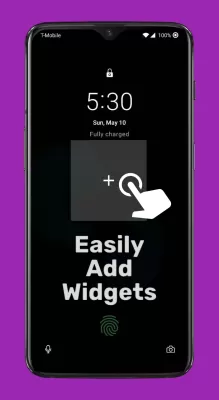
Revamp your lock screen with ultimate customization options. Enter editing mode by tapping the frame with two fingers. Resize frames, reposition widgets for that perfect layout, or remove unwanted ones easily. Keep it personal. Want a cleaner look? Just tap the frame with three fingers to temporarily hide all widgets. Ideal for meetings or focusing on important content. Don't worry - your widgets will return when you turn the screen back on, ready to keep you updated.
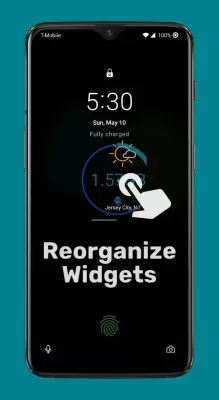
Versatility is key with Lockscreen Widgets. Any widget from your home screen can shine on your lock screen. Quick access to the weather, fitness tracking, or events—all at your fingertips. This functionality transforms your lock screen into a powerful tool beyond just unlocking your device.
Android once offered lock screen widgets, but they disappeared with Android 5.0 Lollipop. Some brands brought limited versions back, but now Lockscreen Widgets revives the full functionality—with extra perks:
Paged "frame" format over your lock screen
Easily add new widgets with a single tap
Every widget gets its own page for easy access
Rearrange widgets by holding and dragging
Edit mode for resizing, moving, or removing widgets
Add any home screen widget to your lock screen
Background opacity settings for a seamless look
Ability to hide widgets during notifications.
Experience the magic without needing ADB or root access. Convenient permissions management keeps everything simple:
Accessibility
Activate to display on the lock screen.
Notification Listener
Automate hiding during notifications.
*Note: Works on Android Lollipop 5.1 and later.*
To maximize your experience, ensure you allow accessibility features, notification reading, and photo library access for Lockscreen Widgets and Drawer. These permissions enhance the application’s performance, resulting in a smoother user journey. Grant them fully for an elevated experience with your personalized lock screen.

DuckDuckGo MOD APK
83.35 MB + 5.219.0
Unlocked, VIP
KSWEB MOD APK
167.18 MB + 3.987
Unlocked, Pro
Dr.Fone MOD APK
148.03 MB + 5.2.8.896
Paid for free, Free purchase
Game Translate Master MOD APK
83.04 MB + 2.0.6
Unlocked, Premium
Adguard MOD APK
58.28 MB + 4.9.105
Unlocked, Premium

ZArchiver MOD APK
4.96 MB + 1.0.10
WO Mic MOD APK
5.79 MB + 5.0
Unlocked, Pro
HideX MOD APK
30.01 MB + 3.5.17.4
Unlocked, VIP
AVG Protection MOD APK
39.13 MB + 6.42.1
Unlocked, Premium
HiPER Calc Pro MOD APK
6.77 MB + 11.0.4
Paid for free, Patched
2Accounts MOD APK
32.55 MB + 3.9.6
Unlocked, VIP
GetThemAll MOD APK
26.66 MB + 3.6.4
Unlocked, Premium
MaterialPods: AirPods battery MOD APK
52.52 MB + 6.63
NetSpot WiFi Heat Map Analyzer MOD APK
27.40 MB + 4.0.6
Unlocked, Premium, Mod Menu
Fake GPS Location Spoofer MOD APK
7.43 MB + 90.0
Unlocked, Premium
PDF editor & PDF converter pro MOD APK
21.46 MB + 8.22
Paid for free, Free purchase, Mod Menu

Spatial Touch™ MOD APK
56.82 MB + 1.1.18
Remove ads, Unlocked, Pro
PDF Reader - PDF Viewer MOD APK
57.39 MB + 2.1.8
Unlocked, Premium
PoMelo File Explorer - File Manager & Cleaner MOD APK
62.47 MB + 1.7.9
Unlocked, Premium
iCall OS 18 – Phone 15 Call MOD APK
+
Text Converter Encoder Decoder MOD APK
9.73 MB + 4.0.8
Unlocked, Premium
WhatsDelete MOD APK
6.27 MB + 1.1.94
Unlocked, Premium
Time Arrow MOD APK
17.86 MB + 1.10.8
Unlocked, Premium
App Freezer MOD APK
7.93 MB + 2.0.5
Unlocked, Premium